Posts

Showing posts with the label QuickBooks Repair

How to repair QuickBooks file that won't open

Image
QuickBooks is one of the most popular accounting software. The software has amazing features like; Report generation, Invoice creation, budget tracking, etc. These features are customizable according to the user’s need. In a case study , QuickBooks has 80% market share with 29 million small businesses. The software helps to companies to stay organised with a large amount of data. With lots of remarkable features, the software is also prone to corruption. Here, I am going to discuss, how you can repair the QuickBooks company file (.QBW) that will not open. Before proceeding to the solution, you should know the reasons for it. Incorrect method to open the QuickBooks file Other windows are open in within the file Opening the QuickBooks file in the wrong version Issue with the file location, such as access permission for the file Compressed file Incorrect file name and file extension Data damage in the file  Solutions Update the software : QuickBooks provides the ma...
How to Troubleshoot Damaged QuickBooks Data

Image
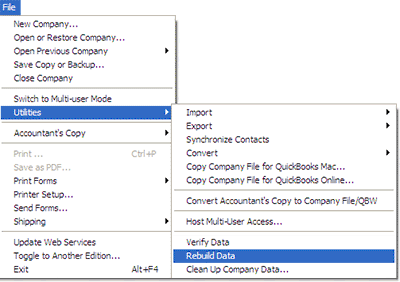
QuickBooks is an accounting software. In other words, you can say it is a money management software that uses the file of .qbw file extension to store data. This blog outlines the solution to repair damaged QuickBooks data file. With the help of these troubleshooting steps you will be able to fix the problem. Restore from the backup: Yes, your backup can be superhero here and restore your data. If you have clean and updated backup then it is the time to use it.  Note: Make sure your backup is latest otherwise you will lose the recent change or update of your data. By creating new company file: You can replace your old company file with the new one. You can export the information such as; customer, vendors, account chart, etc. into newly created file. This method will help to avoid the future problem and improves the performance. Read these points related to troubleshooting Open the computer where actual company data file is stored Do not perform rebuild act...

Repairing Corrupt QuickBooks Company File

Image
When it comes to managing business financial data from small to medium sized organization then most of the business administrators or owners are do-it-myself behavior. They believe in doing their own task themselves. This is because they don’t want to invest extra money or self-service oriented personalities. Software like Intuit’s QuickBooks can manage all the business financial data very easily with safety and security. It is suitable for both accounting and non-accounting professionals. One of the most frustrated moment comes during use of QuickBooks is a corrupt or damaged QuickBooks data file. If you have verified that your QuickBooks is corrupt then the first best option is to try Stellar Repair for QuickBooks Software ; it repairs and recovers damaged QuickBooks data file without any modification in the original file. However, if you are do-it-yourselfer nature then see all below steps for identifying and repairing a corrupt or damaged QuickBooks data file (.qbw). Identif...

Repair Corrupt Quickbooks Files If Backup Is Not Available

Image
It is very mush possible that stored QuickBooks data can get corrupt any time. So it is advisable that always keep back-up of all your important data or files. There are number of reason due to which QuickBooks files may get corrupt, if you don't have updated backup then it is quite difficult to recover your data. In that case QuickBooks repair methods or software will be very helpful. Today I am sharing few appropriate QuickBooks recovery method to repair damaged QuickBooks files which you can try your own and no expertise required: If you can Open corrupt file : In this situation, you can use inbuild tool verify and repair to repair corrupt QuickBooks file. Open QuickBooks click on File. In File menu Utilities>Verify Data. Run this tool two times. Then go to File > Utilities > Rebuild. If you can't open corrupt file: This is the situation when you have least possibility to repair corrupt QuickBooks file. But in some cases these met...

How to solve QuickBooks Error Code: 20890 78242

Image
While working on QuickBooks, you may have experienced several types of error messages such as alert message, some may be warnings and some may be problem messages. In the case of problem error messages, QuickBooks may do not allow you to work properly. Even in some cases QuickBooks could not open. There are several reasons for these errors like QuickBooks not installed or updated properly, virus attack and QuickBooks database corruption etc. Intuit define each error with a code and offer some sort of solution and tools for each one, Repair data utility is a in build tool for QuickBooks repair and fix damaged file error codes. Here I am explaining QuickBooks error code 20890 78242 which is actually faced by my friend. He is using windows server 2003 SP2 and QuickBooks enterprise solution 11.0. He updated his QuickBooks version from 10.0 to 11.0. For a week or so it works perfect but from past few days he is continuously getting “ Error Code: 20890 78242 ” and he have to a...

How to Fix QuickBooks Error 16026

Loosing valuable accounting data may create negative effect on your business. It is actually a disastrous situation for your accounting Data Company if you are not able to access your valuable data from QuickBooks files which have the records of one or more than one year due to lost or damaged of file. In the data corruption situation in quickbooks your main goal is to repair quickbooks files.  QuickBooks repair  can be done effectively with the help of a third party QuickBooks repair software file. Consider a scenario. Sometimes, due to virus attack, many attempts to download quickbooks file get failed. This is a faulty incomplete download of quickbooks files which make .qbw file corrupt and you will receive a following error message while accessing it.   "Error 16026" Above error message pop up every time you make an attempt to download. Cause: Causes that are responsible for the occurrence of above error message are: 1. some connectivity ...

How to Solve “Error -6000, -80” Error of QuickBooks Company Files

Image
Image via Wikipedia This error is reported in the latest version of Intuit QuickBooks pro 2011. This error appears while opening company files. Due to Error -6000, -80 working on QuickBooks get difficult and every time same error message pop up on screen. First it is very important to resolve this error-6000, -80 to work properly on QuickBooks. QuickBooks has given the solution to overcome this problem with two competent tools to check the integrity and the connectivity abilities of the company files. Use these tools or use updated backup of the company files for solving this issue. You can also use third party QuickBooks Repair software as well to solve above problem. You will receive different type of errors in different cases of company file corruption. In one case when you try to open a company (.qbw) file when you receive a n error message while doing it. “ Error -6000, -80: An error occurred when QuickBooks tried to access the company file” Reason for a...

How To Solve “Invoice Showing Zero Balance” In QuickBooks

Image
Image via Wikipedia Are you facing problem while working on quickbooks (a accounting software )? Is your quickbooks does not opening properly? If your answer is “YES” then it may be possibility that your quickbooks is getting corrupt. Actually quickbooks stores all its data inside a database, which have .QBW extension, this database can get corrupt due to virus attack or improperly system shut down. To overcome from corruption you need to rebuild your quickbooks or use quickbooks repair software. Here I am describing a quickbooks corruption case in which Invoice showing zero balance while it is paid by costumer. Scenario: An invoice was created from an estimate. The customer paid the full invoice amount. The payment was received against the invoice and posted to undeposited funds. The deposit was created as usual. Problem: When we go back into "receive customer payments", the Invoice still shows with the full balance owing. However, if we open the...

How to Fix QuickBooks Errors While Connecting to Access Database

Linking with access databases is a very easy process but it become difficult at some point of time while QuickBooks database get corrupted or connectivity is not properly done. QuickBooks database will not open properly in both situations. In both cases QuickBooks database will become inaccessible for the user and in worse case user may face data loss situation. If you have backup of QuickBooks data then you can avoid data loss situation. Otherwise you need to use QuickBooks recovery software to get back your data. You can't run any query on database table to access data from QuickBooks database and not able to see information in the QuickBooks table, if access database is not properly linked with access database. Here are some sample messages: “QuickBooks has detected a potential problem in your data file. Please restart QuickBooks and open this company file. From the Windows menu, choose Close All. Then, from the File menu, choose Utilities, and then choose Verify Data. C...

How to repair corrupted QuickBooks database

Image
QuickBooks is use to store information related to Customers, Vendors, Employees , company. It has very interactive interface to add, delete and manage records. It saves all information in .QBW file which is only accessible with QuickBooks. Data which is stored in QuickBooks database is very important because it contain information related to client and employees. If your QuickBooks database get corrupted due to virus attack or any other reason than all QuickBooks data will be inaccessible for user. Till the date QuickBooks don’t have in-built utility to repair damaged data. You need to use third party QuickBooks repair software to repair damaged or corrupted QuickBooks database. When malicious virus attacks on QuickBooks database then header of database files gets corrupted. Whole QuickBooks data become inaccessible due to this issue. In this situation QuickBooks start giving number of Error message which are listed below. W32.Blaster.Worm 'Error C = 342 ",...

QBW File Recovery to resolve Error -6000, -816 in QuickBooks 2008

Image
Image via Wikipedia A QuickBooks database stores crucial accounting information pertaining to a company's business. It keeps track of the company's transactions with its customers, vendors, and employees. This database is likely to get corrupt due to various reasons, such as file header corruption, operating system bugs, virus infections etc. Corruption leads to QBW file inaccessibility and thus causes data loss. To overcome the problem, you need to repair QBW file by using a reliable third-party utility. For instance, when you try restoring a QuickBooks 2008 backup file, you may receive the following error message: “ (-6000,-816): QuickBooks was unable to open the company file because the file is in use. Another person may be in the process of opening the company file.” Cause : The above error may occur due to any of the following reasons: You have installed Symantec Endpoint Protection client 11.0.5 Release Update (RU) 5 or Small Business clien...

Stellar Phoenix Recovery for QuickBooks v2.0

Stellar Phoenix Recovery for QuickBooks is a software application that recovers damaged and corrupt QuickBooks files. The software efficiently recovers almost every bit of information in the damaged QuickBooks file. Key Features • Provides the option to select corrupted (*.QBW) file from desired location • Provides the option to search for the QBW file(s), incase if you do not know the location of corrupted (*.QBW) files • Displays preview of Company information (Company name, Address, Phone number, fiscal year, e-mail, website, legal address, city, country, etc.) • Displays preview of Chart of Accounts (Account name, Account Type, Description and Balance) • Displays preview of Items and Services (Item name, Item type, Description and Price) • Displays preview of Customers and Jobs information (Customer Name, Address Info, Additional Info, Payment Info, Job Info and Notes) • Display preview of Customers and Jobs transactions (Invoices, Estimate, Sales Ord...