Posts

Now Excel is available everywhere

Image
It is important to every business owner that their customers are able to get their Excel spreadsheets from anywhere on every device. Microsoft introduced a new feature 'Excel Interactive View' in Excel 2013 to solve this issue. Now we can say that Excel is available all over the web. Here is the quick overview of this feature:  When you find this Excel Button on the web, just click it and you’ll see the simple HTML table with filters, conditional formatting, sorting, and charts options. You can also download it to your desktop to open it in Excel.  You can also add this Excel Button on your website page by adding one line of HTML & a JavaScript tag to the bottom of the page to generate Excel table and chart views on your web page. Benefits of this feature: Now we can use Excel online just like we used it offiline. Even MS Excel is not installed on your system; users can use analytical power of Excel on any HTML table on any web page, in most the browsers...
How to Open & Edit PDF file in Word 2013

Image
One of the most advance features of Word 2013 is PDF Reflow in that you can use to convert a PDF File into a Word file & can also open & edit the PDF file content. This feature works with all PDF File versions, but the results are best for textual documents. Please take a look of this feature:  Here is the example of PDF Reflow conversion:  When you convert PDF file in to Word using PDF Reflow then it creates a copy of your content during the conversion process. If the results are not up to your need then your original file are still in safe hand.  How PDF Reflow works:  PDF is a fixed file format which includes the text, fonts, graphics, and other information needed. When you open a PDF file in Word 2013, PDF Reflow constructs a new Word document from it; you can easily your PDF file content in it. PDF Reflow used a system of complex rules to figure out what Word objects (like headings, lists, tables, etc.) would best represent the origi...

Excel Startup Errors Solutions

Image
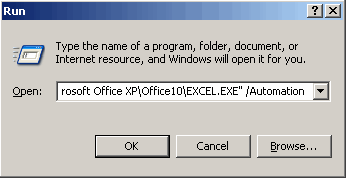
Sometimes Excel users experience with Excel File problems while they try to start Microsoft Excel. Some of the known issues are: Corrupted Excel program shortcut   Conflict with another program Incorrect version  Corrupted add-ins under the Tools menu Registry keys Corruption Other problems when opening Excel files You may experience these startup errors when you try to start Excel by clicking a workbook file, or when you run Excel from the Start menu. To resolve these issues, use following steps:  1. Excel shows errors during startup process: If the excel shows an error message during starting process then you should follow these steps to fix the issue: 1. Open Excel without any Add-ins: You can open Excel without Add-ins by using Automation switch from the XLSTART folder: Click Start, Run, "C:\Program Files\Microsoft Office\Office\Excel.exe" /Automation If the error still occurs then it may be due to add-in or a (hidden) workbook that is lo...

MS Office Word 2013 Most Popular Error Message

Image
Microsoft Word is used by millions of people, even the profession is whatever; this is the need of every single user. When this program gets faltered, it can affect your overall work. Now After the launch of MS OFFICE 2013, most of the users are facing a common error message in MS Word.  May be you are one of them just like me. Here are all steps which I follow to get Word back on track.   After installing MS Office 2013 , when I try to open WORD doc, I am facing the problem of WORD shutdown & starting given me an error message: “MS Word is trying to recover your information” After canceling this error message, it shows following error message: I found these Quick fixing steps: Try open these documents with Open and Repair. (File --> Open --> Browse --> Open and Repair) Try to repair your Office program and reboot your computer as a quick fix. Run Word in safe mode to determine if this could be caused by the 3rd-party add-ins.  Run WinW...

MS Office 2013 Overview

Image
Hi!! Welcome to MS Office 2013    Let's Start with  Word 2013 Starting Screen: This is the starting screen of MS Word 2013: Have you notice some changes in the starting page? Yes!! Left-hand pane shows recent documents. Now let's take a look of right area of starting screen. First of all a blank document and a Ribbon user interface has a new Design tab, from where you can change all your design changes in one place. More options include fonts, paragraph spacing, themes, and adding watermarks to documents etc... Here is the list of changes : In new Read Mode, you will see that text reflows automatically in columns for easier on-screen reading. There are Fewer menus available which means more focus on your content You can also open a PDF in Word, and also can edit content. You can also add Online Videos Show your style by using Word templates in more than 40 categories Now it's time for Excel  Excel 2013 Starting Scre...

Is your zip file get corrupted due to big file size?

If your zip file is larger than 4 Gigabytes then it might be no longer accessible, and most probably it may got corrupted when you try to unzip the file. In such situations when you create the zip file you'll not receive any error message but after creating you cannot read the file. This issue can occur because the zip file size limit is approximately 4 GB or the file is severely got corrupted. To resolve this issue, first ensure that you limit the size of a compressed folder to 4 GB or less when you create a compressed folder. Here are a few other points which you also get consider: Browser: Sometimes Internet Explorer often caused this kind of problem. So you can choose another browser like chrome to resolve this issue FTP: If possible, you can try to get download from an FTP server via FTP (File Transfer Protocol) rather than HTTP (Hypertext Transfer Protocol). From the name you can see that FTP is dedicated to transferring files. Command-line download utiliti...

Is your PowerPoint file really got corrupted?

Have you ever suffer with any PowerPoint file corruption error message. If yes then first answer these questions to ensure that your file is really corrupted: Is your file password-protected? If you are trying to open your password-protected file in previous version of PowerPoint then in this case you may also receive PowerPoint file corruption error message. Did you receive this file by e-mail attachment? If you receive file by email attachment & give an error message while you trying to open it then you should again try to download it & again try to open it. If you still get corruption error message then ask the sender to send it again. Are you trying to open PowerPoint file created in a previous version? If you are trying to open your file in previous version of PowerPoint then you may also receive file corruption error message. In this case you should 'Check for Updates' option from the Help menu then install the Critical Update. If all above conditi...