Posts

How to Repair a Corrupt Excel file in 5 simple steps
Image
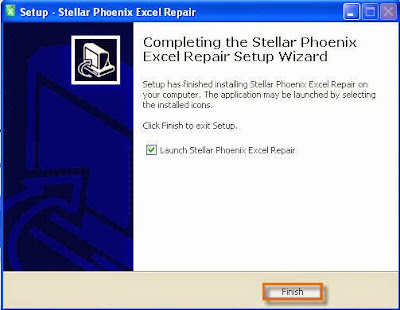
It often happens that an Excel file gets corrupt due to numerous reasons: power failure, application error, virus, and many more. If it has happened to you then hang on! You can still recover your million dollar data from corrupt Excel file. Here is the best method that will help you in recovery of your data from corrupt Excel file. You need to follow just 5 simple steps to perform the recovery of data: 1 . Download & Install Stellar Repair for Excel  on the system where the corrupt file is placed. Follow the simple software instruction to complete the installation process. 2 . Software will automatic launch on your system after finishing the installation process. Now click on the ‘Select file’ button to select the corrupted Excel file. After selecting the corrupt file; click on the ‘Scan’ button to see the preview of your data. Additionally you can use ‘Search File(s)’ option to search the all Excel files; if you don’t remember or sure about the location of corrupt fi...

Repairing Corrupt QuickBooks Company File

Image
When it comes to managing business financial data from small to medium sized organization then most of the business administrators or owners are do-it-myself behavior. They believe in doing their own task themselves. This is because they don’t want to invest extra money or self-service oriented personalities. Software like Intuit’s QuickBooks can manage all the business financial data very easily with safety and security. It is suitable for both accounting and non-accounting professionals. One of the most frustrated moment comes during use of QuickBooks is a corrupt or damaged QuickBooks data file. If you have verified that your QuickBooks is corrupt then the first best option is to try Stellar Repair for QuickBooks Software ; it repairs and recovers damaged QuickBooks data file without any modification in the original file. However, if you are do-it-yourselfer nature then see all below steps for identifying and repairing a corrupt or damaged QuickBooks data file (.qbw). Identif...

Repair Corrupt ZIP File using ZIP Repair Software

Image
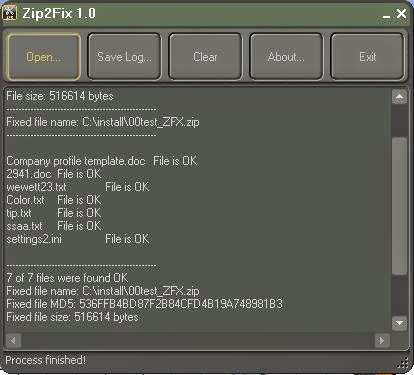
When a zip file is corrupt or damaged and you don’t have backup of file, don’t give up. You can still recover your data using any of these zip repair software. Some of the software are totally free to use while some are paid. Note : Even If user has maintained the backup of file, zip file corruption can still be dangerous because backup file would not have updated data always.   Use any of the following zip repair software to recover data from corrupt zip file: Zip2Fix : I have tested this tool on purposely corrupted zip (said above) file and can say that it is a good tool for the purpose that is designed for. Tool is not a rocket science; it is all about algorithm that is used to extract data from corrupt or damaged zip file. After repairing the corrupt zip file, tool creates a new zip file with same suffixed with _ZFX.zip. This newly created file contains all the data. You can also check the log report to see what has been recovered and what not. You can download Zip...

Fix PowerPoint found a problem with content in the presentation filename.ppt/pptx

Image
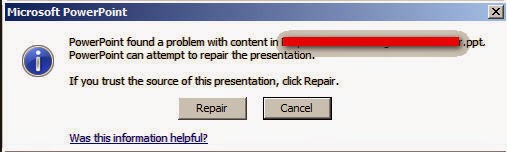
Periodically, MS PowerPoint presentations that you received in your E-mail from your friends, boss, marketing executives etc. perform oddly. Previously you were able to open the slides but suddenly fail to open or get error messages. Here is the error message that comes up on your screen: “ PowerPoint found a problem with content in the presentation filename.ppt ” In PowerPoint 2003 & lower versions “ PowerPoint found a problem with content in the presentation filename.pptx ” In PowerPoint 2007 & upper versions Click on the ‘Repair’ button, if trust the source of this presentation. This Repair button will frustrate you more when it does not repair anything. How to fix the problem? You can fix this problem by following these steps: Download & Save the file on your computer or laptop Right click on the file and select ‘properties’ Select ‘General’ tab, if it is not selected.  Now click on the ‘unblock’ button to unblock the file. Click OK to...

Easily Repairs Corrupt Excel File

Image
Excel file repair is a very hot topic. What do you do if your very important excel file has been corrupt or damaged that was saved as xls or xlsx file? You don’t have backup of that important file, which you should have or backup has been lost/corrupt too. How do you re-gain the data of Excel file? In this article I will try to list all the possible solution to fix this unpleasant task.     Don’t worry! It can happen with anyone. I will share 5 methods for recovery of data from corrupt or damaged excel file. Success is not guarantee, you may loss the formatting. But I will guarantee that you will be able to save the text data after performing any of the methods.  There are five main reasons for Excel file corruption and the reasons are: Faulty Hardware: In a research, it has been found that 92% of Excel file corrupt occur due to hardware problem. Hardware problem can be overheating, device conflict, faulty component etc. If you found any of the above problems ...

Windows XP - Backup Your Data and Avoid Data Loss

Image
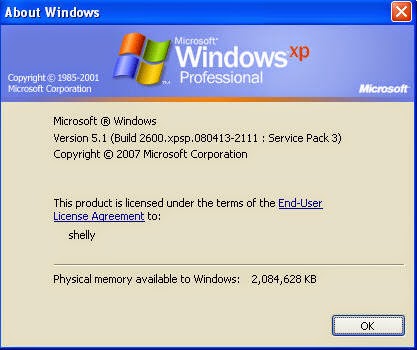
Maintaining backup of data is the most important task that user can performs in his/her computer. A data can be anything and present in any form on user computer like Word document, Excel spreadsheet, PowerPoint presentation, file, folder, notepad document and many more. If you don’t maintain backup copy of your data, you may risk of data loss. Hard drive failure is the most common cause for the data loss from the computer; it stores the data that you save in your computer. It has been seen that there are some viruses program that not only affect the computer but delete the important files and folders. So it is very important to use an effective anti-virus program and update it continuously. Backup Your Data : Backup is like second life of data so it is very important to backup your data, here you will learn about how to backup data on Windows XP machine. I am running Windows XP professional , version 5.1 in my computer Steps to Backup: To complete the backup of your...

Fix Excel Error - The file you are trying to open is in different format than specified by the file extension

Image
I got below error message when I tried to open my Excel file: “The file you are trying to open is in different format than specified by the file extension. Verify that the file is not corrupt and is from a trusted source before opening the file. Do you want to open the file now?” I clicked on the ‘Yes’ button to open my file. But MS Excel did not open my file. There is a blank workbook. I was shocked because we were updating this workbook since last three years.  This is how I repair it: Open & Repair : I tried this method by following below steps: Office Button->Open->Select your file->Click arrow next to open button->Open & Repair When I tried above steps, got another pop-up message “ Excel can perform checks while opening the workbook and attempt to repair any corruption it detects, or extract just the data (formulas and values) from the workbook. •    Click Repair if you want to recover as much as of your work as possi...