Posts

Showing posts with the label powerpoint repair

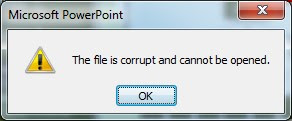
How to fix the Microsoft PowerPoint error “The file is corrupted and cannot be opened”
Image
Microsoft PowerPoint is a powerful software developed by Microsoft. It is a very important part of the Microsoft Office suite. People use it to represent the information through slides. You can add several multimedia files like photo, audio, video into it to make it more impressive. Sometimes, you try to open your important PowerPoint file and you got below error message. You can try below five methods to fix this error message: Method#1 Open and Repair Open Microsoft PowerPoint Go to File tab and click on the Open Select the corrupted PPT file Select the Open and Repair option from the drop down menu. Method#2 Component Security Setting To set the component security setting, follow these steps: Start RUN, enter dcomcnfg and press the OK button. Expand Component Services -> Computers . Now right click on My Computer and select the Properties . Choose the Default Properties tab and set the following: Default Authentication level: Co...

Top 5 Solutions to Repair Corrupt PowerPoint File

Image
PowerPoint is a very well know tool that comes as a part of MS Office suite. Often people use it to create presentations for different purposes. Generally, PowerPoint files are larger in size and have a complicated file structure due to which they are prone to corruption. It takes a lot of efforts and hard work to create a PowerPoint presentation in MS PowerPoint, but due to corruption it could be useless. Like every other computer file, PowerPoint presentations can corrupt or also become inaccessible at any time. When a corrupt PPT file starts sending you error messages while opening, it is an indication of corruption, which could be major or minor. Let's check out some common solutions that you can perform on your corrupt PPT files in order to repair them or to retrieve the content. Solution 1 You can simply move the corrupt PowerPoint to a different location. This is a very simple and useful way to troubleshoot your corrupt PPT file and remove its problems. You...

Troubleshooting for an error message “There was an error access C:\documents and settings\username\Presentation.pptx”

Image
Microsoft PowerPoint Icon (Photo credit: Wikipedia ) There are tons of reason due to which PowerPoint presentation become inaccessible for users. When users click to open PPT, it ends up with some error message. PowerPoint corruption is one reason for inaccessibility of PPT. There are several causes for MS PowerPoint corruption like virus attack, improper system shutdown, MS office corruption, OS corruption, damaged hard drive etc. In such case there is no need to worry of PPT corruption because there are several PowerPoint repair tools & manual methods available to repair damaged files. While opening a PPT file getting an error messages is depend on type of PPT corruption. One such error message is “There was an error access C:\documents and settings\username\ Presentation.pptx” . The PowerPoint corruption is main reason for this type of error. Solution: Such errors can fix by opening corrupt PPT in earlier version of MS PowerPoint, l...

How to Recover Corrupt PowerPoint Presentation With .TMP files

Image
--> Virus attack, improper system shutdown, MS office corruption or hard drives crash are the few reasons which lead to PowerPoint file corruption. Corrupt .ppt files sometimes refuse to open and pop up some error messages. Or some corrupt files open but shows garbage data. So question is that how we can repair corrupt powerpoint files? Is there any manual method available or need to use Powerpoint repair software? This article will provide answer of these two questions. Yes! There are few methods available which easily repairs corrupt PowerPoint files. MS PowerPoint offers Open and repair option to repair damaged data or you can open a .ppt or .pptx file in MS word, it will recover your data back. If above written two methods doesn't applicable for you then don't worry there is another method which you can try. You can use .TMP files to recover corrupt Powerpoint files. You can try the following steps as written below: ...

How to solve powerpoint error “PowerPoint cannot open the type of file represented by .ppt”

MS PowerPoint is very effective tool to create powerful presentation. But it can get corrupt like other MS office applications. When you try to open a ppt or pptx files you may get error “PowerPoint cannot open the type of file represented by .ppt” in this case PowerPoint does not allow to access your file. In this post I will explain reason of this type of error and tips to overcome from this error . Cause of the Error : there are mainly two reasons behind this error both are listed below. If PowerPoint file is password protected and created in PowerPoint 2002 (xp) or letter version and you are trying to open it in earlier version. Because earlier version cannot open password protected files that is why producing such type of errors. PowerPoint file corruption can be the other reason of the above error. Solution : There are several possible solutions of above problem is available. If you are owner of the file then remove password of t...

How to solve error message "PowerPoint can't open the type of file"

Image
Suppose a situation in which you get PowerPoint presentation from your friend or client. But when you tried to open it, in your computer you get error message "PowerPoint can't open the type of file" . You may think that your PPT is get corrupt, but you need to think again check the version of your PowerPoint. If you are trying to open password-protected PowerPoint presentation in earlier version of PowerPoint viewer which are created in PowerPoint 2007, 2003, 2002 then you will get above written error. Microsoft support provide simple solution for this error, which I will discuss further. But if you are sure that PowerPoint presentation is create in PowerPoint 2007, 2003 or 2002, and you are using same version to open it, then this error message means that your PPT is get corrupt and you need to apply PowerPoint repair methods to repair it. Cause of the Error : This behavior occurs when you attempt to open password-protected Po...