Posts

Showing posts with the label word recovery

Methods to Recover & Repair Microsoft Word Document

Image
Microsoft Word is the most popular word processing tool around the all IT users. Users use it to create and store their content, information, chart, document, report, and many more. All we know that files are prone to corruption in this modern age of technology and Microsoft word is not an exception. So it is recommended to backup all your data to avoid data loss. If you want to recover Microsoft word document then the first question comes in mind how the word document was lost in the first place. If the word document has been lost or deleted then you need to recover it no matter it was deleted by mistake or intentionally. If the word document is exist but you are not able to open it then your document is corrupt or damaged and you need to repair it. How to recover lost or deleted word document? If you are unable to find your word documents on your machine then it might be possible that you have deleted your document by mistakenly or someone has deleted your document intent...
Word File got stuck what to do next?

Are your unable to open a word document, if yes then there are various reasons behind this MS Word Documents behavior. The most common reason is MS Word document corruption. You can try several methods to open your damage documents. Here is the list:  Method 1: Try to open Damaged Word Document in Draft Mode:  First you should try to open a document in draft mode. After that when you open the file, you may able to repair corrupt document: Use following steps 1. View menu>>Normal. 2. Tools menu>>Options>>View tab>>Draft Font  If this solution does not work then try method 2.  Method 2: Try to Open the File in WordPad: 1.Windows>>Run>>type WordPad>>OK. 2.Now try to open the corrupted document in Wordpad. A dialog box will popup & specify ask for how you want to convert the file. Click to 'No Conversion' button. 3.Now The Word for Windows document is now open as a text file. You may see binary   characte...

How to Solve an Error “Cannot open "Documents\The” of MS word

Image
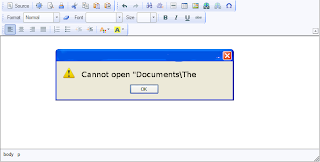
--> When MS word gets corrupt, it givesseveral types of error while opening it. Error message is depend oncause of corruption. You will receive different type of error messagein different scenario. Here I am providing solution for “Cannotopen "Documents\The” error message which you will get,when you try to open MS word file. Along with this error message youmay get few massages which are written below... “ Cannot open C:\My” “ Cannot open "Test.doc"” Main Cause of the problem: MS wordcorruption is not basic cause of this type of error. The main causeof this problem is registration of your MS word version is get expireand you need to re-register to fix this problem. The process ofre-registering is very easy and you can perform it very easily. You can use bellow written method on MSword 97 and above version Boot your system. Click on Start --> Run When run box open type winword /r command and hit Enter. Note: Don't forget to...

Why the Word Document Crashes When I Click into the Table

Image
MS word is very useful application which allows you to insert pictures, tables and drawing in the documents. While working on MS word you may faced this situation that when you click into the table word document automatically get crashed and your whole work lost. You never know what is the actual problem, why MS word got crashed? It may be possible that your word file may get corrupt due to this problem. This post deals with why this problem occurs and how you can resolve it. Cause of the problem: MS word offers some very advanced features to make word documents attractive but wrong implementation of these feature sometimes create problem for user. Features like ‘Around’ has good feature, it makes the table behave like a floating graphic object; can be cause of the above problem. The ‘Around’ option which is available under Text Wrapping (or you can get by clicking and dragging with the Table Move Handle) has turned on for your table. Solution of the problem: If yo...

How To Create MS Word Backup Automatically

Image
F ile corruption is a big issue with Microsoft office documents. There are number of reasons which can create a cause of corruption in MS excel, word, PowerPoint and access. Virus attack, improper system shutdown, OS corruption are the main causes for MS office file corruption. In this article I am going to explain, how you can automatically create a recovery file in MS word to avoid data loss, in the case of MS word corruption. If you don’t have recovery file and MS word document got corrupted, in that case you need to use word repair software to recover valuable data. Creating backup of your work is simple solution of word corruption relate problems. But sometimes it happen that user forgets to create backup of important work. Or MS word document is get corrupt while working on it. Both these cases lead data loss (if file get corrupt). Fortunately MS word packed with some very intelligent tools which can create backup automatically and recovery file at some specific i...

How to Solve Corruption of Normal.dot of MS Word

Image
Normal.dot file is template file and it is the basis of all new word files. MS word documents may get corrupt if Normal.dot file get corrupt. The corruption can be possible when user creates macros, migrating profiles or at the time of creating custom templates which accidentally overwrite the Normal.dot file. To fix Normal.dot file corruption apply word repair methods as given below: To fix Normal.dot file corruption you need someone (Your friend or colleague) who have same version of MS office and can send same version of word file. Step1. Make all hidden and protected files visible in file viewer. Follow these steps to make files visible. File --> Tools --> Folder Options Click the View Tab Show Hidden files & Uncheck the two Hide Options Step2. Fix Normal.dot Corruption Open up Explorer and navigate to: C: / Documents and settings / / Application Data / Microsoft / Templates Copy and paste file that you get from someone (Y...

Resolving “Word was unable to read this document” Error and Recovering Your Precious Word Document

Image
Image via Wikipedia Have you ever faced a situation in which your Microsoft Word document suddenly starts showing junk characters when you try to open it? Or at times you become unable to open the Word file? These are the clear indications of Microsoft Word document corruption! In addition various messages indicating corruption of Word document flash on your screen when you attempt to open a corrupt Word document. These are the unexpected data loss situations and happen to knock out valuable Word doc completely from your computer without any prior notice. However, if you have the backup of your Word document then you can very easily get over this problem but in the unavailability of proper backup third-party Word repair tool can do the needful. Consider a practical scenario wherein you encounter the below mentioned error message while trying to open one of your most crucial Microsoft Word2003 document: “ Word was unable to read this document. It may be corrupt . T...

Easy way to Repair Corrupt Word File

Image
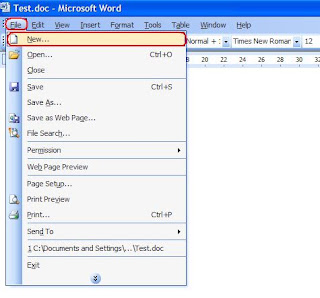
It may be possible you too have experienced the same, while working on some important MS word document suddenly your system get shut down due to power failure or any other reason. Next time when you open your word document it shows some error which says document file is unable to open in MS word. Your all attempt to open that file may get failed due to file get severely damaged. As solution you need to apply some recovery method or word recovery tool to repair corrupt word document. Microsoft office support offer few methods to repair severely damaged word documents. One such method is Insert corrupt word document as a file in new word document . This methods work perfectly in several corruption cases but not in all. Recovery of your word file will depend on how severely files damaged. Follow the steps given below to apply above method... On the File menu, click New . Select Blank document . On the Insert menu, click File . ...

How to repair corrupt word file when MS word fail to repair

Image
Image via Wikipedia Every computer user face MS word corruption problem due to any of the one reason behind this it may be saving the file when you are running out of resources, with a corrupt template, or while working with master documents, nested tables, etc. Recover Text Converter is a feature included in MS Office suite of applications that allows us to recover text from any file corrupt MS Office. This feature can retain headers, footers, footnotes and any form of simple text but not able not able to convert images, fields, drawing objects etc. In some cases of corruption, it may be possible that the Recover Text converter is not able to identify the type of corruption. This can result in the loss of valuable information stored in the corrupt Word file, which in turn requires you to go for the repair of the Word by using trusted word repair software. For example, you have MS Word 2000 Standard Edition installed on your system. When you are trying to open a Word...

Easy Steps to Repair Corrupt MS Word Documents

Image
Image via Wikipedia --> Sometimes when you are trying to open MS word document but it doesn't open, an error message pop up. Continuously you received same message once you open that document. In most of cases, corruption of word document is main reason of error messages. MS word get corrupt due to various reasons like virus attack, improper system shutdown, MS office corruption etc. In each case your word document will not work properly. Word Recovery is required to repair damaged MS word file. There are two ways to repair corrupt word documents, first use conventional methods to repair damaged doc file, second method is to use word repair software. Here is the detailed explanation on both methods. Method to Repair Word Document: Try this method when word document is corrupted or damaged due to any reason. a) Open damaged doc file in draft mode. b) To turn off screen updating try this macro in word 6.0 or 7.0. Sub Main Scr...

3 Methods To Repair/ Recover Corrupt Word Documents

Image
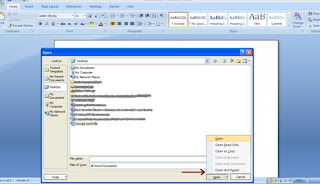
There are several software utilities, offering to repair damage d Word files. Most of them are commercial, and q uality of the work is questionable. After doing som e research I foun d three ways to repair corrupt word files which are described below: 1) Open and Re pair utility: I have found this little trick to rep air Microsoft Word, using the integrated capab ilities of Microsoft Word. The method worked perfectly for two files, which are badly corrupt and need to recover formatti ng. The process was quick, easy and requires no additional softw are download. Step 1 - Open Microsoft Word. Step 2 - Click Fil e -> Open -> and select the damaged do cument, highlighting. Do not click on the file because it opens by default. Step 3 - Click the arrow on the Open button and select Open and R epair. Please ref er to the image below. 2) Use docx2txt damaged (Free Tool): Microsoft Office Word 2007 / 2010 document might be corrupted due to various reasons, two of th...

How to Repair Corrupt or Damaged MS Word File

Image
Image via Wikipedia MS word is one of the most used utilities. It is used everywhere in office, school and at home. People use word files to write thesis and important notes. Suppose you spend several hours to write some thesis or important note, next time when you tried to access that doc file, it gives error that document has been corrupted. In above situation your whole work has gone waste. MS word documents can get corrupted or damaged due to several causes like improper system shutdown, virus attack, operating system corruption and power outage etc. To prevent data loss due to corruption of word file windows provide some helpful tools like “backup copy” and “AutoRecover”. With the use of these option user can recover lost or damaged documents. In order to use these options you need to change settings of MS word. If your word documents get corrupted and your “backup copy” and “AutoRecover” setting is not enable then windows can't help you to repair damages...

How to successfully repair corrupt word files

MS-Word application sometimes exhibit unusual behavior. In other words, it starts showing you unexpected behavior. Such behavior includes unreadability, inaccessibility, and more. It might be possible that you have not faced such kind of strange behavior. But corruption makes MS-Word application problematic. If by chance you face such behavior in future that all your data becomes unapproachable, then it is advised to make use of a backup. But if backup falls too weak to recover data, then it is good to go for a third party Word Repair software to repair word file and to recoup all your data back safely from the damaged or corrupt Word document. Let's illustrate above issue. Let's consider a practical situation. Suppose, on one day your friend has called you and discuss a problem with you that he is facing in MS-Word. He had created some documents in MS-Word application, a problem is that when he starts MS-Word application in his system, documents starts showing ...

Tips to recover data from corrupt word file

Have you lost your data file in Word, due to corruption of the latter? However, data lost due to damage to the Word file can be recovered by the use of an efficient word recovery software. Word files are text files that contain text and documents in a much more secure and organized. You can write articles on different types of formats from regular text, vite curriculam, business letters, formats of data. The tool even allows figures and images to be included in the document to make it more vivid and realistic. With all these facilitis, the Word file is not exempt from getting corrupt. You may encounter the following error message when working with Word files: "The document name or path is not valid. Try these suggestions. Check the file permissions for the document or drive. Use the File Open dialog box to locate the document. " or "Word can not open the document" or "Word can not open the document: user does not have access privileges" or...

Repairing Corrupt Word 2007 Files

Like other files word documents can be corrupted due to virus attack or improper system shutdown. This situation become worse when you have some important information in word files, these files could not be open by any other method until you repair it. There are two methods to word repair . 1) MS word In-build method 2) Use word repair software. Both can repair your files in to original form. But first try MS word In-build method to repair if it didn't work then go with second method. Steps to repair corrupted doc files: Fortunately MS word 2003, 2007 and 2010 have option to repair your corrupted doc and docx files. You need to follow few simple steps to repair your corrupt files. 1) Start MS word 2) Click on Office button and click on Open. 3) Select Corrupt files from open dialog box 4) Click down arrow which is next to open button. Open menu will pop up. 5) From Open menu select "Open and Repair" Wait for a while word will repair your corrupt doc/docx f...