Excel Startup Errors Solutions
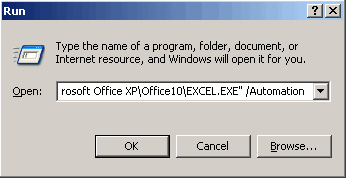
Sometimes Excel users experience with Excel File problems while they try to start Microsoft Excel. Some of the known issues are: Corrupted Excel program shortcut Conflict with another program Incorrect version Corrupted add-ins under the Tools menu Registry keys Corruption Other problems when opening Excel files You may experience these startup errors when you try to start Excel by clicking a workbook file, or when you run Excel from the Start menu. To resolve these issues, use following steps: 1. Excel shows errors during startup process: If the excel shows an error message during starting process then you should follow these steps to fix the issue: 1. Open Excel without any Add-ins: You can open Excel without Add-ins by using Automation switch from the XLSTART folder: Click Start, Run, "C:\Program Files\Microsoft Office\Office\Excel.exe" /Automation If the error still occurs then it may be due to add-in or a (hidden) workbook that is lo...