Posts

Showing posts with the label zip repair

Repair Corrupt ZIP File using ZIP Repair Software
Image
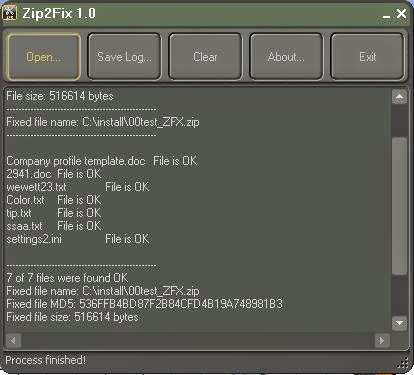
When a zip file is corrupt or damaged and you don’t have backup of file, don’t give up. You can still recover your data using any of these zip repair software. Some of the software are totally free to use while some are paid. Note : Even If user has maintained the backup of file, zip file corruption can still be dangerous because backup file would not have updated data always.   Use any of the following zip repair software to recover data from corrupt zip file: Zip2Fix : I have tested this tool on purposely corrupted zip (said above) file and can say that it is a good tool for the purpose that is designed for. Tool is not a rocket science; it is all about algorithm that is used to extract data from corrupt or damaged zip file. After repairing the corrupt zip file, tool creates a new zip file with same suffixed with _ZFX.zip. This newly created file contains all the data. You can also check the log report to see what has been recovered and what not. You can download Zip...

Is your zip file get corrupted due to big file size?

If your zip file is larger than 4 Gigabytes then it might be no longer accessible, and most probably it may got corrupted when you try to unzip the file. In such situations when you create the zip file you'll not receive any error message but after creating you cannot read the file. This issue can occur because the zip file size limit is approximately 4 GB or the file is severely got corrupted. To resolve this issue, first ensure that you limit the size of a compressed folder to 4 GB or less when you create a compressed folder. Here are a few other points which you also get consider: Browser: Sometimes Internet Explorer often caused this kind of problem. So you can choose another browser like chrome to resolve this issue FTP: If possible, you can try to get download from an FTP server via FTP (File Transfer Protocol) rather than HTTP (Hypertext Transfer Protocol). From the name you can see that FTP is dedicated to transferring files. Command-line download utiliti...

Causes & Solutions of Corrupt Zip Files

Zip files are daily used by most of the internet users. As we all knows that you can use Zip files to transfer several numbers of files in a single folder. Internet network is not as secure as we think , there are more chance of virus attack over network, which may severely corrupt your zip files .In such a circumstance we are unable to access Zip files. Here are some most common causes which lead to Zip file corruption: Causes of Zip File Corruption: Corruptions in the file system or the header of Zip file   The most common error is transfer error when downloading a Zip file from the internet. While we download the Zip files over the network then there are hmore chance of Zip File corruption due to virus attacks. One of the most common factors of ZIP file corruption is CRC errors. Incomplete download of ZIP file from internet is another reason of Zip file corruption.  Sudden System shut down due to power failure or by some other reason, while extracting a Zi...

Zip Repair or RAR File Repair Solution for an Error “This is not a valid win32 application”

Image
WinZip and WinRAR are the most important and widely used software to compress file. These tools have excellent compression capabilities due to this WinZip and WinRar are most in the demand from all over the Globe. Once we compress the files then we can get more storage space in the hard disk. User can send large files as attachment through email very easily after compressing the large file with WinZip and WinRAR tools. But sometimes these compressed files get corrupt due to several reasons and users get few errors while accessing compressed .zip or .RAR files. To repair these corrupted Zip files it is important to use Zip Repair tools. Cause: There are several reasons due to which compressed files (.zip or .rar) may get corrupt few are as follows: Due to virus attack Improper System Shutdown Improper Download etc. If zip files affected by any of above written reason then it is possible to face these written errors. "Cannot open file: it does not app...

How to use command line add-on to repair invalid zip files

Image
Image via Wikipedia Zipped file make it much easier to send and receive large files through e-mails. With the use of compressed files format (like .zip) we can convert large files into small files that can be sending via e-mail. But these zip file may get corrupt due to several reason like virus attack, at the time of attachment with slow Internet; improper downloading of zipped files etc. In the file zip corruption situation you cannot access your data which is present inside zipped file. In that case you need to use some repair method or use zip recovery software to repair corrupt zipped file. WinZip offers several methods to repair corrupt .zip or .zipx files depend of corruption cases. Invalid zip file corruption case can be handled by WinZip Command Line Support Add-On. But this command line support add-on not support of all version of WinZip it works for WinZip 10.0 and later versions. Depends on your version of WinZip you can download appropriate version of com...

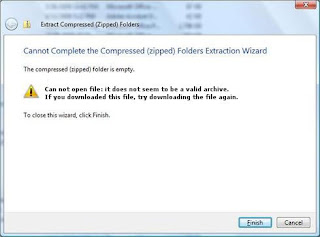
How to solve error message: “Can not open file: it does not seem to be a valid archive” of corrupt zip file

Image
The extension of Zip files is . "Zip" or ".ZIP" file and MIME (Multipurpose Internet Mail Extensions) media type application. Sometimes there are certain errors in Zip file, which occur due to some problems of the Internet. These errors usually occur when you download the Zip file, which leads to corruption. As a result of corruption, the data stored in the Zip file is inaccessible. To overcome such situations, you can restore data from a recent backup. However, if you do not stored a backup or the backup is corrupted, then you need to use zip recovery software files to recover your data. Suppose you are trying to download attached zip files from outlook, you can not do so and get a message "Can not open file: it does not seem to be a valid archive. If you downloaded this file, try downloading the file again. " The data stored in the zip file, becomes inaccessible after the occurrence of above error message. Reason for error message...

How to recover data from corrupted zip files

Zip format is used to compress large files in to compact form to send via email. You need to download and extract properly zipped files because it may get corrupted while downloading process. Improper download leads to corruption of zipped files and whole data become inaccessible for user. You need to repair zip file with zip recovery software to access your data again. There are operations that are not so important in any organization, but you can create a blockage in large-scale operation. WinZIP file corruption is also one of the problems that came to light when essential data is stored in the WinZIP file is corrupted. There is nothing to ignore, therefore, immediate repair and recovery is needed to recover data from corrupted Zipped file. You can repair the zip file, with the help of postal repair tools, as these tools are specially designed to perform complete and accurate recovery of any damaged or corrupted WinZIP file. Tools Zip Repair you can extract all poss...