Posts

Nailed the Excel file error: data may have been lost
Image
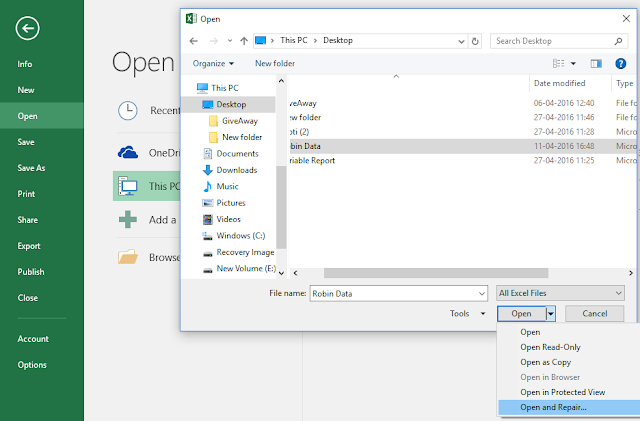
Sometimes it is difficult to fix few MS Excel file related errors and file error: data may have been lost is one of them. Generally, this error occurs due to compatibility issue or corruption in MS Excel file. You should not ignore this error message because it can compel you into a severe data loss. Let’s see some possible solutions to fix this error: Open Excel file in safe mode: We have two options to open MS Excel in safe mode. Using Command: To open excel file in safe mode, press Windows key + R , and type following command and press enter: Excel.exe /s . Note : There is a space between Excel.exe and /s. Next, open the file in safe mode. Manual: Go to Options->Add-Ins . In Manage option , click on Disable Items and click on Go button. After pressing Go button, the items will be listed in the disabled item list. You can enable them so it will help to reopen the Excel file. Rename the File: Rename the excel file and try to open it once again. If the problem s...
Fixing QuickBooks Error 6000, 816

While working with QuickBooks, a user may encounter error 6000, 816 on their screen, owing to which they will not be able to access the QuickBooks company file. In this article, you will learn the reasons for this error code and how you can fix it. So let’s begin identifying the reasons first as this will help troubleshoot the error code. What are the possible Reasons for Error 6000, 816? QuickBooks generates this error message when it is unable to open the QuickBooks company file. It can happen due to several reasons such as: Specified company file is already in use by another user. File might be corrupt or damaged. Specified file is not supported. Third-party application. “ (-6000,-816): QuickBooks is unable to open the file because the file is in use by another person or damaged or not supported. ” Troubleshooting Methods for Error 6000, 816: There are several troubleshooting methods available to fix the error, though it largely depends on the root cause. Close Q...

How to fix QuickBooks Error -6190, -816 like an expert

Users may get the different errors while working on the QuickBooks and one of the most common error is -6190, -816. Here I am going to describe the reasons for this error and possible solutions to fix it. Mismatch between the .qbw file and .tlg file. Another user is logged in single user mode. Data corruption in QuickBooks data file. These are the few reasons which can be responsible for this error. To fix this issue, check the following solutions: Solution 1:  Mismatch .tlg file Check the name of .tlg file. Its name should be the same as company data file. If it is not same as company file then, right click on the .tlg file and rename it. Solution 2: Another user logged in Ensure that, all users have been logged out. Restart the computer. Copy your data file into local drive then copy it back to its original location. Now open the file in QuickBooks. Solution 3: Data Corruption If the corruption is in the data file (.qbw) then you can use ...

Different JPEG errors and their solutions

Image
JPEG is very famous native media format and it is used by the people of different fields like designers, photographer and, students etc. It is a well-known format so no needs to introduce it. I had few photos in JPEG format and few of them were looking messy when I opened them. Well, being as an IT professional, I love to find and execute new ideas so I read about the common errors of JPEG and write this blog for you. JPEG error #53  This Error may occur by the following reasons: Due to insufficient memory on the disk. Availability of bad sectors. Damaged file header. Improper SD card removal from the device which has JPEG images. When a user clicks the picture and battery is low. Solution: Try to open the file in Paint or Photoshop and resave it. It may fix the error. JPEG error #42 Generally, this error occurs due to the size of the file or when a user saves the file at 100% quality. Solution: Save the file in less than 100%. Some points of quality are give...

A conversation on repairing a Corrupt Excel File

I attended a tech seminar a few months ago and stop by a conversation that had stuck with me through the months. The conversation was going between two tech guys; you can call them Excel expert and Mark. Mark is my good friend; he is a tech blogger who loves to play with technology, gadgets, and participates in all tech seminars organized in the city. Here I am sharing those conversations with all of you. Seminar organizer was introducing the entire guest with all of us. Most of people silently concentrated and listening the organizer while Mark and Excel expert were busy in conversation. I can’t ignore that conversation because I was seated next to the Mark. Initially I thought they were disturbing me but I was wrong. They were talking about Excel file corruption. Mark: My Excel file is corrupt, when I try to open the file got error message. File is very important for me because it has a lot of contact details of my friend. I am updating this file from last six years without any...

A Useful Program for Windows Backup files Recovery

Image
Windows backup file exists in the three file formats (BKF, ZIP and VHDX) and these formats depend on the version of operating system. In Windows 10 and Windows 8.1, backup file is created in VHDX format. The ZIP file is created in Windows 8/7/Vista and BKF file is created in Windows 2003/2000 and XP. Backup files are the best way to get the data back but what will happen when your backup file got corrupted? To know the answer just stays on the blog and I will tell you the solution to repair the backup files. There are so many tools are available for windows backup file recovery but I found a single tool which is able to repair all types of backup files. The tool name is Stellar Phoenix Windows Backup Recovery and it is developed by one of the best data recovery firm. Let’s check the recovery process step by step: Step 1:  I downloaded the tool from official website Step 2:  Now I installed on my machine. Step 3: The software interface automatically opened after compe...

How to resolve excel format error

Image
Microsoft Excel is very helpful for the user because it gives the capability to create spreadsheet to organize the data in a correct way. Sometimes when a user performs an inappropriate action then it throws errors. Excel format error is a very common error for excel users but you should be aware of its reasons and solutions. Generally, it occurs when user completed the work and tries to save the file. This error doesn’t allow to the user to save the file and by this, a user can lose the important data. An insight about the error “Too many different cell formats” – this error comes many times when a user format a cell or the cell ranges in Excel 2003. The complete error message looks like this: Too many different cell formats. Excel encountered an error and had to remove some formatting to avoid corrupting the workbook. In MS Excel 2007, 2010 and 2013, the formatting error looks like this: Excel found unreadable content in the file. I downloaded a file from the web and go...