Posts

How to Open Damaged Word Document

Sometimes you may get a message that file is corrupted, whereas other times Word would simply say that it cannot open the word file. It means your word document file is get corrupted. It is not necessary that in every corruption scenario you are unable to open your document. So it depends on corruption level. There are many ways to repair corrupt documents but when document is not opening then the steps are different ones: Solution 1: Open the damaged document in draft mode without updating links Step 1: Configure Word First Start Word. View tab> Draft ( the Document Views group) In Word 2007> Microsoft Office Button> Options . In Word 2010> File Menu> Options . Display document content section> Draft font and Picture placeholders check boxes (under Advanced options). General section> clear the Update automatic links> OK . Step 2: Open the damaged document After that Start Word. In Word 2007> ...

How to Repair JPEG Corruption Errors Or corrupt JPEG File

As we all know that JPEG or JPG image format is most common file format used by digital cameras and other photographic image capture devices. Sometimes it happens when you are trying to open JPEG File, it cannot be opened at all by Windows Picture & Fax Viewer, or you get some error message. The most common reason behind this nature is JPEG File Corruption. JPEG File get corrupted due to image header corruption, formatting, power fluctuation, unexpected system shut down & many more.  When the JPEG File get corrupted, either the image shows with thin grey horizontal lines or you got an corruption message on your pc screen.  Some of the Jpeg corrupt error messages:  Cannot read JPG header Unknown JPEG format Corrupted header Unknown file type File cannot be opened Invalid JPEG file structure JPEG file corrupted. Methods to repair corrupt Jpeg files: Easiest & Quickest Methods work in 30% cases:  Restore your damaged jp...

QuickBooks Auto Data Recovery Vs QuickBooks Recovery Software

QuickBooks Auto Data Recovery & QuickBooks Recovery Software can repair corrupt or damaged QuickBooks data files. It is important that you must never ignore if your QuickBooks file get corrupt because once a file get corrupted then it can freeze up company file and won't open. Here are some of the corruption errors messages which can pop up on your screen while you are trying to open QuickBooks file: Missing accounts on your chart of accounts or missing names on your lists Incorrect data on reports, such as missing transactions, negative amounts in accounts that should be positive, unbalanced balance sheets, etc. Error messages, such as "Company file in use, please wait", invalid protection faults, fatal or unrecoverable errors Transactions can't be saved or QuickBooks suddenly shuts down when saving a transaction You can try two options to fix QuickBooks file corruption: QuickBooks Auto Data Recovery & QuickBooks Recovery Software.   In...

5 Easy steps to fix Password Protected PDF File Corruption

Image
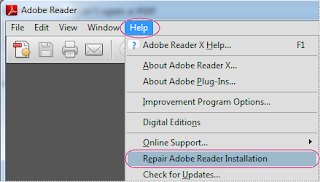
Sometimes PDF user adds password permission to PDF file to prevent it from unauthorized access. To open these files, you must first enter the password. If you don't have password then you cannot open these files. Sometimes a password protected PDF file becomes corrupted & you are unable to open these files. In some cases, When you opened and downloaded these files, it display an error message on screen “file is corrupt or damaged”.  NOTE: If you don't know the password & you want to repair password-protected corrupt PDF File then you must contact the person that created the pdf set password permissions to fix corruption. You can use following three possible methods to repair corrupt pdf file: 1. First open Adobe Reader. After that try to open the file from the FILE pull-down menu. In some corruption cases, it fixes the error.  2. Right-click on corrupt pdf files and try to "Rename” it. Save in with any other file name. Sometimes, this step fixed...

How to fix Error -6000, -305: when opening a company file

Image
If you are using Intuit's QuickBooks for your accounting purpose then you may got this error message when you are trying to open your company file: Error -6000, -305 If you are getting this error you might not be able to open your company file in any case. Two main reasons behind this error: 1) Company file might be corruptted or damaged. 2) An issue with the QuickBooks networking setup There are multiple solutions to resolve this error message: 1) First download and run the QuickBooks File Doctor. The tool will help you to detect QuickBooks data damage & repair it. It the tool doesn't repair it, you have three more options to resolve this: a. Restore from good backup copy of company file: If you have backup then this option is one of the best option to resolve this error. You can select this option from the main menu bar, select File and then Restore. b. Verify Data and Rebuild Data help users to you find and repair damaged  company file. You can s...

3 Best Solutions To Repair Corrupt Word Document

Image
Microsoft Word documents can be corrupted in many situations such as hardware malfunction, software malfunction, virus attacks, corrupt during writing, reading, storage, transmission, or processing word file etc in most of the cases when word file get corrupt then the file becomes inaccessible or sudden corruption error message comes on the system screen.  This article will explain 3 best solution to easily repair your corrupt word documents.   1. Use Open and Repair   Microsoft Word offers an Open And Repair inbuilt option, which you can use to force Word to attempt a recovery. To try this option, use following steps: Open Word, select File–> Open Choose the corrupted file (but don’t open it yet).  After that you will see the “Open” option, there is a little drop-down arrow. Click on this and change the option to “Open and Repair”, then click on it. 2. Open Office a free office suite    It is free & compatible with wo...

How I Fix : “Corrupt JPEG data: premature end of data segment”

Image
I am sharing my personnel experience on how I have solved this error: “Corrupt JPEG data: premature end of data segment”. As per my experience this was the MOST frustrating error which I ever faced. I was getting bad copies of my pictures when copying it from my memory card to the computer. I became aware that something went wrong with my pictures because all pictures wouldn't open in picture viewer. I got few different error descriptions, like 'corrupt JPEG data: premature end of data segment' or 'Not a JPEG file: starts with 0x00 0x00'. I thought maybe picture viewer was crapping out on me, then I tried to open the pictures in photo editing application but the problem remain same!! Pictures would open but the bottom of the pictures would be corrupt. After that, I thought maybe that hard drive is crapping out on me...I started copying photos to a different drive but still the problem remain same!! After a long search on forums & blogs, finally I got t...