Posts

How to Open Inaccessible PDF File

Image
A PDF File called as “Potable Document File” developed by Adobe Systems.  PDF is more secure and dynamic than any other file.  An individual person, businesses, and government agencies all over the world fully rely on PDF files for perfect communication and sharing of their ideas and vision through PDF File. It is possible that sometime users are unable to open PDF files because of some corruption or damage of PDF file. This could be possible due to any of the following reasons: Password protected PDF File PDF File get Corrupted  Damage to the Reader   An out-dated version of Reader 1) Password protected PDF File blocks opening the PDF: Sometimes users add password security to prevent unauthorized users from viewing the PDF. Solution: To open password protected PDF files, enter the password when prompted. If the PDF creator has not shared the password with you then it is difficult to open the file. 2) Corrupt PDF File: Sometimes a PDF file...

Recover Corrupt Excel Sheet By Changing The Calculation Setting From Automatic To Manual

There are few methods which are very helpful to salvage data from corrupt excel file. Different method works in different type of corruption cases, so it may be possible that below written method didn't work for all type of excel corruption cases. Excel repair software is always have upper hand over manual method because it take less time and doesn't need any technical knowledge . If excel file doesn't open at your hard drive or on networks then place it on another drive or from network to local hard disk and try to open. Some times it works. Change calculation setting from automatic to manual to open corrupt excel files. In most of cases this method works perfectly and data from corrupt excel sheet recovered successfully. Use following steps to change calculation setting from automatic to manual. Create a new blank workbook open. To create blank click Microsoft Office Button --> New --> New Blank --> Blank Document . Now click on Microsof...

Know the Causes of PDF File Corruption and How to Repair it?

Image
Like all other documents, PDF files may also get corrupt. There are several causes of PDF file corruption. When pdf file get damaged, it will generate several type of error messages. All error messages depend on causes of corruption. In the pdf file corruption situation you c annot open pdf documents or if it open then garbage data displayed. In this following post I will discuss about causes which leads to PDF file corruption and its solution. Causes of PDF File Corruption: There could be much reason due to which PDF files may get corrupt. Some of most common causes are listed below. Improper Download Process: Most of PDF files are get corrupt due to incorrect downloading process. If Internet connection is disconnected while downloading PDF file then it has huge possibility that file get corrupt. Incorrect Creation process: There are several PDF creation programs are available some uses simple algo other uses very complicated process to create PDF fil...

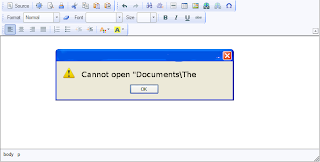
How to Solve an Error “Cannot open "Documents\The” of MS word

Image
--> When MS word gets corrupt, it givesseveral types of error while opening it. Error message is depend oncause of corruption. You will receive different type of error messagein different scenario. Here I am providing solution for “Cannotopen "Documents\The” error message which you will get,when you try to open MS word file. Along with this error message youmay get few massages which are written below... “ Cannot open C:\My” “ Cannot open "Test.doc"” Main Cause of the problem: MS wordcorruption is not basic cause of this type of error. The main causeof this problem is registration of your MS word version is get expireand you need to re-register to fix this problem. The process ofre-registering is very easy and you can perform it very easily. You can use bellow written method on MSword 97 and above version Boot your system. Click on Start --> Run When run box open type winword /r command and hit Enter. Note: Don't forget to...

Why MS Word File Crash on Opening

Is MS word document close soon after you open it? If yes, then read this post to know the cause and solution to overcome this problem. It might be possible that template got corrupted but other there could be more reasons. So let us first verify Is this due to template corruption or something else. To verify it, Start MS word without template and add-ins loaded. Follow the steps to do so..... Click Start and then click on Run. Write winword.exe /a in Run box and hit enter. Note: Remember to place space before foreword slash. In case you miss it then error can occur, “/a” stands for troubleshooting tool only. If your error got fix then it means either your Normal template or one of the files in Word's Startup path are probably corrupt, so you need to try these steps: 1) Try to Rename the Normal template. In word 2007 normal template have .dotx or dotm extension. 2) For example, try to rename Normal.dot to Normal.old. It is advisable to keep only one Normal.do...

Troubleshooting for an error message “There was an error access C:\documents and settings\username\Presentation.pptx”

Image
Microsoft PowerPoint Icon (Photo credit: Wikipedia ) There are tons of reason due to which PowerPoint presentation become inaccessible for users. When users click to open PPT, it ends up with some error message. PowerPoint corruption is one reason for inaccessibility of PPT. There are several causes for MS PowerPoint corruption like virus attack, improper system shutdown, MS office corruption, OS corruption, damaged hard drive etc. In such case there is no need to worry of PPT corruption because there are several PowerPoint repair tools & manual methods available to repair damaged files. While opening a PPT file getting an error messages is depend on type of PPT corruption. One such error message is “There was an error access C:\documents and settings\username\ Presentation.pptx” . The PowerPoint corruption is main reason for this type of error. Solution: Such errors can fix by opening corrupt PPT in earlier version of MS PowerPoint, l...

How to Recover Corrupt PowerPoint Presentation With .TMP files

Image
--> Virus attack, improper system shutdown, MS office corruption or hard drives crash are the few reasons which lead to PowerPoint file corruption. Corrupt .ppt files sometimes refuse to open and pop up some error messages. Or some corrupt files open but shows garbage data. So question is that how we can repair corrupt powerpoint files? Is there any manual method available or need to use Powerpoint repair software? This article will provide answer of these two questions. Yes! There are few methods available which easily repairs corrupt PowerPoint files. MS PowerPoint offers Open and repair option to repair damaged data or you can open a .ppt or .pptx file in MS word, it will recover your data back. If above written two methods doesn't applicable for you then don't worry there is another method which you can try. You can use .TMP files to recover corrupt Powerpoint files. You can try the following steps as written below: ...